The iPad has evolved into a productivity powerhouse, and the right apps are essential to maximizing its potential. These apps can transform the iPad into a tool for students, creatives, and anyone seeking to enhance their productivity.
Goodnotes
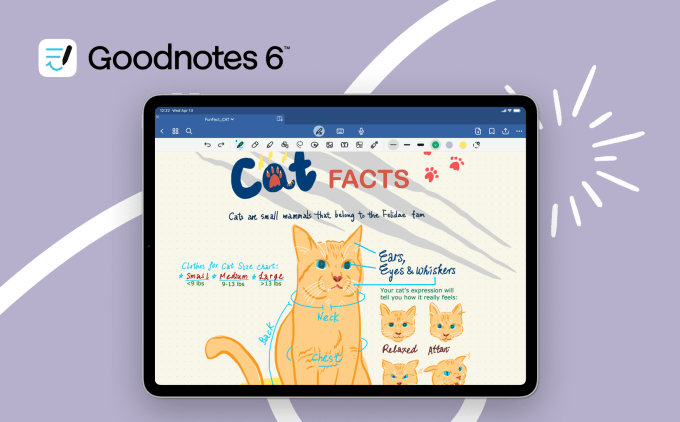
Goodnotes is a staple for iPad users, especially those using the Apple Pencil. It allows users to combine handwritten notes, typed text, images, and doodles on a single page, serving as a digital canvas for thoughts.
Beyond note-taking, Goodnotes is useful for drawing and sketching, offering an accessible option for quick diagrams or visual brainstorming. The app’s audio recording feature, synced to notes, is valuable for lectures or meetings. The AI-powered summarization feature helps users digest lengthy notes quickly. Get Goodnotes here
TickTick
TickTick offers a robust approach to task management, handling both professional and personal to-dos. It provides a centralized hub for managing obligations.
TickTick offers cross-device syncing, calendar integration, and collaborative features. Users can create checklists, set recurring tasks, upload attachments, and share lists. Its habit-tracking feature promotes positive routines, while the “pomo timer” uses the Pomodoro Technique for focused work sessions. Emails can also be transformed into actionable tasks.
Forest
Forest takes a unique approach to productivity by gamifying focus, offering a tangible incentive to stay on task. It provides a method for cultivating concentration.
The concept involves planting a virtual tree when focus is needed. The tree grows as long as the user stays within the app. Leaving the app before the timer expires causes the tree to wither. Over time, a digital forest is built, representing productive hours. Users can earn coins to plant real trees through the Trees for the Future organization.
Notion
Notion aims to be a digital command center, consolidating notes, tasks, workflows, and collaboration tools into a single, customizable platform. It offers a unified environment for managing various aspects of life or work.
Notion‘s flexibility allows it to be tailored to specific needs, such as organizing personal projects, managing team workflows, or streamlining schoolwork. Integrations with apps like Slack and Dropbox enhance its versatility. Templates for travel planning to product roadmaps offer a starting point for any organizational challenge.
Crouton
Meal planning is simplified by Crouton, which provides a centralized hub for recipes, grocery lists, and meal planning. It reduces the mental effort associated with cooking and eating.
Crouton allows users to import recipes from websites or scan them from cookbooks. Users can plan meals for the week, generate grocery lists, and receive meal suggestions. An integrated timer eliminates the need to switch apps mid-recipe. Sharing culinary creations is also simplified.
Freedom
Freedom helps users reclaim focus by blocking distracting websites and apps across all devices. It acts as a digital gatekeeper, preventing engagement with social media and other time-wasters.
Users can create custom blocklists, schedule Freedom sessions, and set recurring schedules for distraction-free periods. The app also offers ambient sounds to enhance concentration. Freedom provides articles and tips on digital wellness, aiming to cultivate a healthier relationship with technology.
Notability
Notability is a note-taking app that allows users to jot down thoughts, import and annotate textbooks, record audio, and sketch out ideas, useful for students, professionals, and hobbyists.
Notes can be taken with an Apple Pencil, text, or audio. The app allows users to search notes, including handwritten ones and uploaded documents. Notability also features AI-generated note summaries and the ability to work on two notes side by side, plus personalized quizzes based on note content.
Todoist
Todoist is a straightforward app that allows users to record and organize tasks using natural language. Tasks can be added using natural phrasing to quickly organize and plan schedules.
Tasks can be sorted into categories like “Today,” “Upcoming,” or custom filters. Todoist can be used for organizing tasks related to work, personal life, education, or management goals and reminders. It can also be linked with calendars, voice assistants, and other tools like Outlook, Gmail, and Slack.
Trello
Trello offers a visual way to track tasks, using a sticky note-like interface.
Trello lets users set up “Boards” for different parts of life, such as work, school, projects, and personal goals, and then set up lists like “To Do,” “Doing,” and “Done” to track progress. “Cards” within boards visualize tasks or items to complete, where descriptions, due dates, checklists, and notes can be added.
The iPad’s transformation into a productivity tool is due to both Apple’s vision and the creativity of app developers. The hardware provides the foundation, but the apps unlock the iPad’s potential.