The most immediately noticeable change in iOS 26.2 beta 2 is the pervasive application of the “Liquid Glass” design language. This isn’t just a superficial coat of paint; it’s a systemic shift that affects everything from menu animations to system app interfaces.
Pop-up menus now boast a snappier, more responsive feel, exhibiting a subtle “bounce” effect at the end of their animations. It’s a small detail, but one that contributes to a more fluid and engaging interaction.
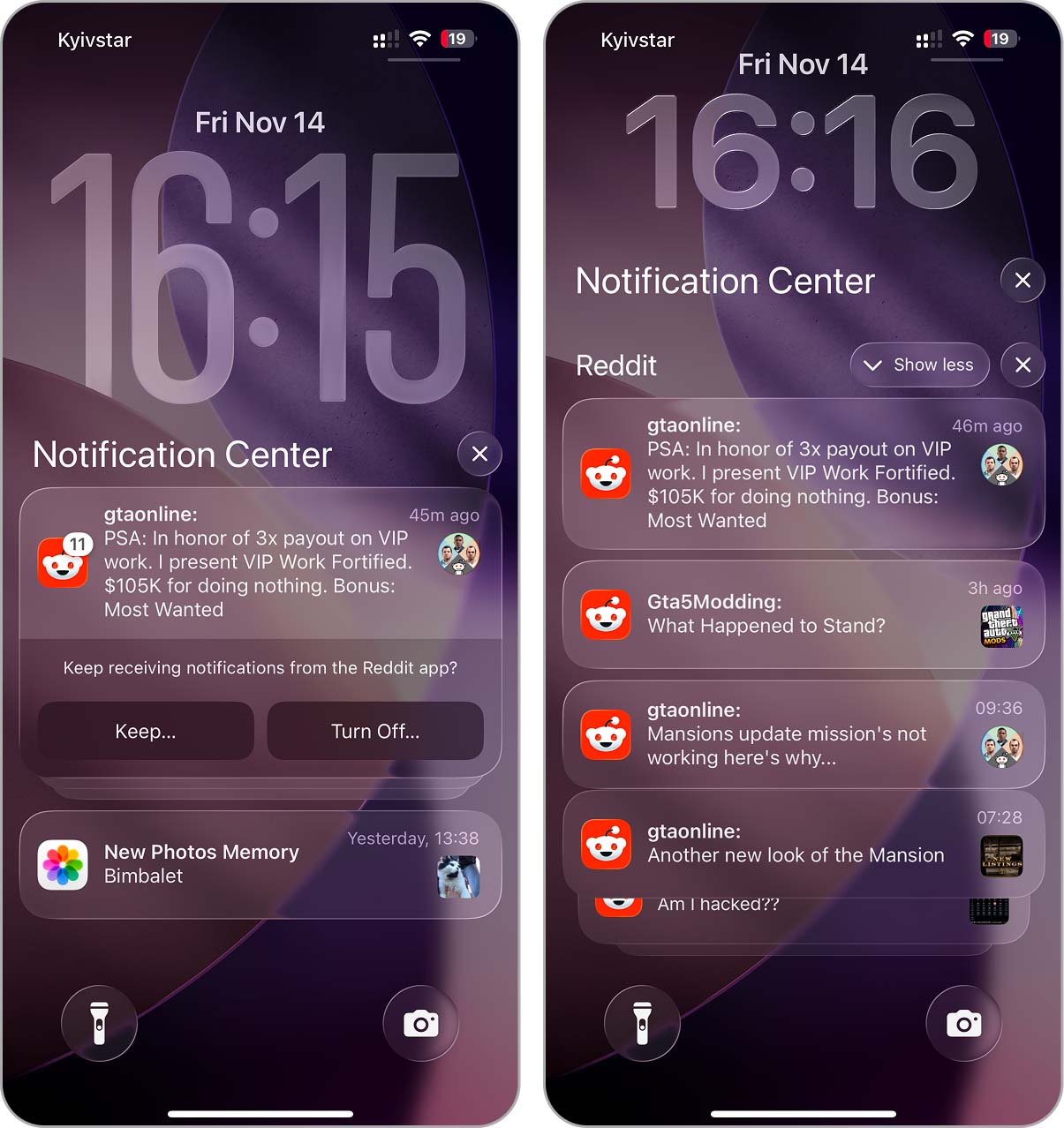
Even the humble Notification Center gets a makeover, with the “Show Less” and “Clear All” buttons now sporting the Liquid Glass treatment. These buttons now dynamically reflect light and change appearance as you scroll, unifying the look and feel of the entire notification panel.
Beyond the visual tweaks, iOS 26.2 beta 2 introduces functional enhancements to several core Apple apps. These changes, while not revolutionary, add valuable utility and demonstrate Apple’s commitment to continuous improvement.
- The Games app now boasts sorting and filtering options, transforming it into a more organized and functional gaming hub. Given the ever-increasing size of mobile games, these features are a welcome addition.
- Reminders now offers an “Urgent” status, effectively turning a reminder into a full-fledged alarm that bypasses Focus modes. A short explanation screen has also been added to explain the feature to first-time users.
- Freeform gains support for tables, enabling users to create more structured and organized canvases for brainstorming and collaboration.
- CarPlay now offers a toggle to disable pinned conversations, allowing drivers to declutter their message list and focus on what matters most.
These additions demonstrate Apple’s attention to detail and its willingness to address user feedback.
One of the most significant improvements in iOS 26.2 beta 2 is the enhanced performance and stability. The animation delays and synchronization issues that plagued the previous beta have been eradicated, resulting in a smoother and more responsive user experience.
Battery life also appears to be stable, with no unusual drain or thermal spikes reported during testing. This is a welcome departure from previous betas, which often introduced battery-related issues.
For a comprehensive list of bug fixes and known issues, Apple encourages users to consult the official release notes.
iOS 26.2 beta 2 is a solid update that focuses on refinement and polish. While it may not offer any revolutionary new features, its incremental improvements contribute to a more enjoyable and efficient user experience. It’s a reminder that sometimes, the most impactful changes are the ones you barely notice.
With beta 3 likely on the horizon, it will be interesting to see what further improvements Apple has in store. Will they continue down the path of refinement, or will they surprise us with something unexpected? Only time will tell.