Google has initiated a comprehensive developer verification process for all Android developers, aiming to bolster security and combat malicious applications. This new layer of security introduces both developer identity verification and app registration, linking applications directly to verified developer identities.
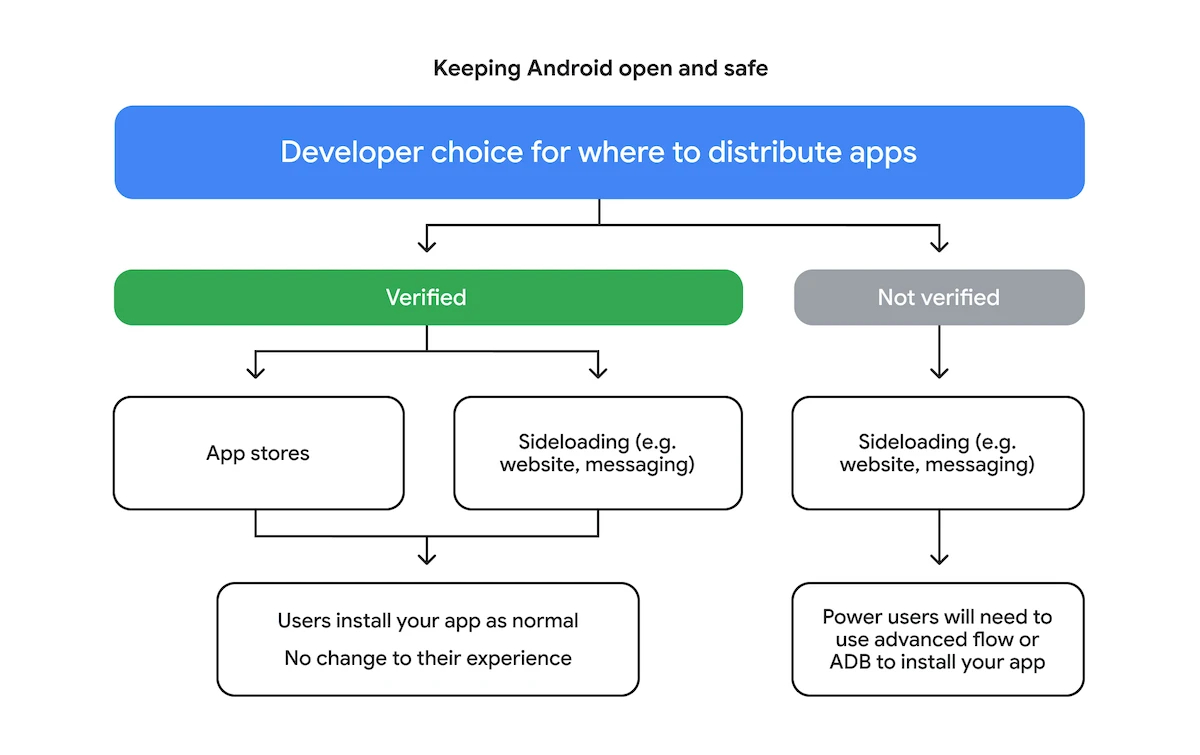
The core purpose of this verification is to confirm a developer’s identity, rather than to review app content, according to Google. This move intends to enhance accountability across the Android ecosystem while preserving its characteristic openness. Apps will soon require registration to a verified developer to be installed or updated on certified Android devices in supported regions.
For most users, the standard app installation experience will remain unchanged. However, additional steps will be required when attempting to install apps not registered to a verified developer, particularly for sideloaded applications.
This initiative directly addresses the challenge of malicious actors operating anonymously and spreading harmful apps. Google’s analysis indicates significantly more malware originating from sideloaded sources compared to Google Play. By linking real-world identities to applications, Google aims to deter bad actors, enforce safety policies, and ultimately build greater user confidence.
The rollout is phased, with user-facing changes beginning later this year. An “Android Developer Verifier” system service will start appearing on devices in April 2026. Initial user-side protections will launch in Brazil, Indonesia, Singapore, and Thailand by September 30, 2026, before expanding globally in 2027.
1. Initiate Verification
Developers can begin the verification process now through the Android Developer Console (for apps distributed outside Google Play) or the Play Console (for Google Play apps). If you already have a verified identity in Play Console, your eligible Play apps may be automatically registered.
2. Provide Identity Information
You will need to provide and verify personal details such as your legal name, address, email, and phone number. Organizations must also provide a D-U-N-S number and verify their website. In some cases, uploading an official government ID may be necessary. Google offers free, limited distribution accounts for students and hobbyists, allowing sharing with up to 20 devices without a government ID.
3. Register Your Applications
Developers must register their app package names, proving ownership by providing the APK signed with their private key to link it to their developer account. The Android Developer Console and Play Console will show your app’s registration status.
Google’s new developer verification and app registration system represents a significant step towards a more secure Android ecosystem. By increasing accountability and transparency, the company aims to protect users from malicious software while maintaining the platform’s openness. Developers are encouraged to complete their verification processes promptly to ensure their apps remain installable and updatable as these changes roll out globally.
Follow Hashlytics on Bluesky, LinkedIn , Telegram and X to Get Instant Updates