The Challenge with Traditional Apache Airflow
Apache Airflow, a popular open-source workflow management platform, traditionally requires significant overhead in terms of monitoring and resource provisioning. MWAA Serverless addresses this by abstracting away the infrastructure layer entirely.
Key Benefits
Cost Optimization
This “Airflow as a Service” model allows users to pay only for the compute time used, eliminating the cost of idle resources. Data teams can submit Airflow workflows on demand, with AWS managing the scaling process automatically in the background.
Enhanced Security
MWAA Serverless includes an updated security model where each workflow can have its own IAM permissions and run on a VPC of the user’s choice. This provides precise security controls without the need for separate Airflow environments, reducing security management overhead through AWS Identity and Access Management (IAM).
Dynamic Resource Scaling
The service focuses on cost optimization and security by dynamically scaling resources and using granular IAM permissions, ensuring efficient resource utilization.
Technical Architecture
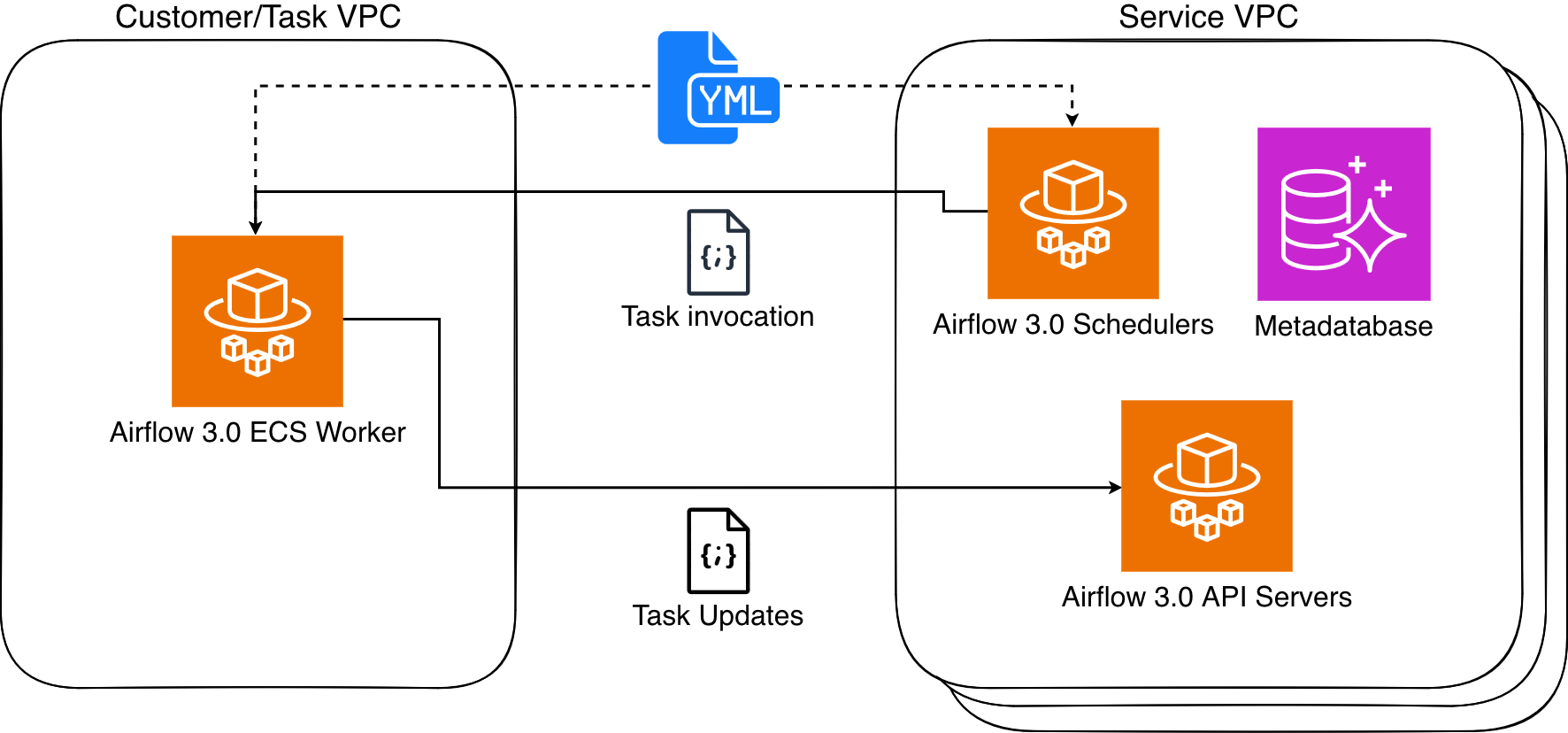
MWAA Serverless relies on Amazon Elastic Container Service (ECS) and Fargate to execute tasks in isolated containers, either within a customer’s VPC or a service-managed VPC. These containers communicate with the Airflow cluster using the Airflow 3 Task API.
Workflow Definition
Workflows are defined using declarative YAML files based on the DAG Factory format. This approach enhances security by isolating tasks and limiting permissions to only what is necessary for each task.
Workflows can be written directly in YAML using AWS managed operators from the Amazon Provider Package. Existing Python-based DAGs can be converted to YAML using the AWS-provided python-to-yaml-dag-converter-mwaa-serverless library, available through PyPi.
Important Limitations
While MWAA Serverless provides numerous benefits, users should be aware of certain limitations:
- Operator Support: Currently supports operators only from the Amazon Provider Package
- Custom Code Integration: Custom code or scripts need to integrate with AWS services like AWS Lambda, AWS Batch, or AWS Glue
- No Traditional UI: The traditional Airflow web interface is absent, with workflow monitoring and management handled through Amazon CloudWatch and AWS CloudTrail
This shift requires a different approach to observability but offers a more streamlined and centralized experience.
Migration and Conversion
Converting Existing DAGs
AWS provides a conversion tool to migrate existing Python DAGs to the YAML format required by MWAA Serverless, simplifying the transition and leveraging existing Airflow investments.
Installation:
pip3 install python-to-yaml-dag-converter-mwaa-serverlessConversion Process:
- Install the converter
- Run it against Python DAG files using:
dag-converter convert - Deploy the resulting YAML files to MWAA Serverless
AWS also offers comprehensive guidance on migrating existing MWAA environments to serverless.
Sample Python to YAML Conversion
The converter can transform Python code that creates multiple S3 objects using the S3CreateObjectOperator into equivalent YAML definitions, maintaining functionality while adapting to the serverless format.
Monitoring and Observability
Effective monitoring is crucial for any workflow orchestration system. MWAA Serverless provides several monitoring capabilities:
Workflow Execution Status
- Detailed information available through the
GetWorkflowRunfunction - Errors in workflow definitions are flagged for quick identification and resolution
- Task logs stored in CloudWatch for granular insights
Enhanced Monitoring
AWS offers example implementations for creating detailed metrics and monitoring dashboards using Lambda, CloudWatch, Amazon DynamoDB, and Amazon EventBridge, available in a GitHub repository.
Getting Started
Setting Up IAM Permissions
Create the necessary IAM role and policy to allow Airflow Serverless to assume the role. The policy grants access to CloudWatch Logs and S3 buckets.
Sample Workflow
A sample YAML workflow definition simples3test demonstrates listing objects in an S3 bucket and then creating a file listing those objects.
Basic Operations
Creating a Workflow:
- Copy the YAML workflow definition to an S3 bucket
- Create the workflow in MWAA Serverless
- Start a workflow run
Managing Workflows:
- Use
get-workflow-runto retrieve workflow run status - Use
aws mwaa-serverless list-workflowsto list available workflows - Use update commands to modify existing workflows
Task Management:
- List task instances for detailed execution tracking
- Get task instance details including log stream information
Cleanup:
- Delete workflows when no longer needed
- Remove IAM role policies
- Remove YAML files from S3
Migration from Existing MWAA Environments
For organizations with existing MWAA deployments, AWS provides commands and guidance for:
- Updating the MWAA execution role
- Copying YAML files to the MWAA S3 bucket
- Creating workflows in MWAA Serverless
- Maintaining continuity during the transition
The Bigger Picture
Amazon MWAA Serverless represents a significant step forward in data orchestration, enabling data engineers to build more scalable, cost-effective, and secure data pipelines. This move signals a broader trend towards serverless computing in the data space, potentially reducing infrastructure management burdens and allowing data teams to focus on driving insights and innovation.
By abstracting infrastructure complexity and providing robust security controls, MWAA Serverless positions itself as an attractive option for organizations looking to modernize their data orchestration capabilities while maintaining enterprise-grade security and cost efficiency.