Technical Architecture
DuckDB implements a columnar storage model with vectorized query execution, processing data in batches of 1,024-2,048 rows rather than row-by-row. This approach optimizes CPU cache utilization and enables SIMD (Single Instruction, Multiple Data) operations that accelerate aggregations, filters, and joins on analytical workloads. Unlike row-oriented databases like SQLite that excel at transactional operations, DuckDB’s column-major format compresses similar data types together and reads only required columns during query execution.
The engine’s out-of-core processing capability automatically spills intermediate results to disk when memory pressure exceeds thresholds, allowing queries on 100GB+ datasets with 8GB RAM. DuckDB manages this through a buffer manager that tracks memory-resident blocks and evicts least-recently-used pages, similar to PostgreSQL’s shared buffers but optimized for single-process access patterns. Performance degrades gracefully as datasets grow beyond memory, unlike pandas operations that fail with MemoryError exceptions.
Performance Characteristics
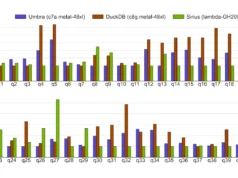
Benchmarks demonstrate DuckDB’s advantages for specific operation types. Aggregations with GROUP BY clauses execute 3-8x faster than equivalent pandas operations on datasets over 1GB due to hash-based grouping algorithms optimized for columnar data. Join operations show 2-5x improvements when both tables exceed memory because DuckDB’s partitioned hash joins stream data rather than materializing entire DataFrames. Filtering operations gain 1.5-3x speed from predicate pushdown that skips irrelevant Parquet row groups entirely.
However, row-level operations where pandas excels — such as applying Python functions to individual records or complex conditional logic — show minimal improvement or perform worse in DuckDB. The engine’s vectorized execution model introduces overhead for Python UDFs that must cross the native code boundary repeatedly. Point lookups and small result sets (under 10,000 rows) also favor pandas due to DuckDB’s query planning overhead.
Integration Patterns
DuckDB operates in three modes: in-memory (`duckdb.connect(‘:memory:’)`), persistent file-based databases, and direct file querying without intermediate loading. The zero-copy integration with pandas and Arrow enables `register(‘table_name’, dataframe)` to create queryable views without data duplication. For Parquet files, DuckDB reads metadata to determine column statistics and row group boundaries, enabling predicate pushdown that reads only necessary data blocks.
The SQL interface supports standard DML/DDL operations plus extensions like `read_csv_auto()` that infers schemas, `read_parquet()` for columnar files, and glob patterns (`’*.parquet’`) for multi-file queries. Window functions, CTEs, and complex joins execute through a cost-based query optimizer that generates execution plans similar to PostgreSQL but optimized for single-threaded analytical access.
Operational Constraints
DuckDB’s concurrency model limits practical applications. The database supports multiple readers but serializes writes through a single writer lock, making it unsuitable for OLTP workloads requiring high transaction throughput. Concurrent read-heavy analytical queries work well, but write-intensive applications experience lock contention. This positions DuckDB as a read-optimized engine for ETL output, batch processing, and interactive analysis rather than a PostgreSQL replacement.
Memory management requires attention in constrained environments. DuckDB defaults to using all available CPU threads and memory, which can starve other processes. Production deployments should explicitly set `threads` and `memory_limit` parameters. The buffer manager’s aggressive caching can also cause unexpected memory spikes during complex queries with multiple hash joins or sorts.
While DuckDB handles datasets exceeding RAM, performance on truly large data (500GB+) depends heavily on query patterns. Queries requiring multiple blocking operators (sorts, aggregations, joins) that each need substantial intermediate storage will experience significant disk I/O. For petabyte-scale data or distributed processing, Apache Spark or cloud data warehouses remain necessary.
Ecosystem Position
DuckDB’s growth trajectory centers on embedded analytics use cases. The MotherDuck platform extends DuckDB to cloud storage with hybrid execution that processes data locally when possible and offloads to cloud compute for larger operations. Integration into BI tools like Evidence, Rill Data, and Metabase demonstrates adoption for dashboarding directly from data lakes.
The project’s post-1.0 stability and adoption in data quality tools (Great Expectations), orchestration frameworks (dbt), and as a Pandas/Polars accelerator indicate maturing production readiness. Development focus on improving out-of-core performance for complex queries and adding native cloud storage connectors will determine whether DuckDB can handle the upper range of single-machine analytics workloads.
For data scientists and analysts, DuckDB democratizes data warehouse-level performance by eliminating infrastructure overhead for datasets under 1TB. The ability to query Parquet files directly from S3 or local storage without loading into memory transforms data lake exploration from a Spark cluster requirement into a laptop-scale operation.
Quick Start Examples
pip install duckdb
import duckdb
conn = duckdb.connect(':memory:')  # In-memory database
# Or persistent: conn = duckdb.connect('analytics.duckdb')
# Query pandas DataFrames
import pandas as pd
df = pd.DataFrame({'id': [1, 2], 'sales': [100, 200]})
conn.register('sales_data', df)
result = conn.execute("SELECT * FROM sales_data WHERE sales > 150").fetchdf()
# Direct Parquet querying with predicate pushdown
conn.execute("""
  SELECT category, SUM(sales)
  FROM 'data/*.parquet'
  WHERE date >= '2024-01-01'
  GROUP BY category
""").fetchdf()
# Replace slow pandas operations
# Instead of: df[df['sales'] > 1000].groupby('region').sum()
conn.execute("""
  SELECT region, SUM(sales)
  FROM df_view
  WHERE sales > 1000
  GROUP BY region
""").fetchdf()
Follow us on Bluesky , LinkedIn , and X to Get Instant Updates