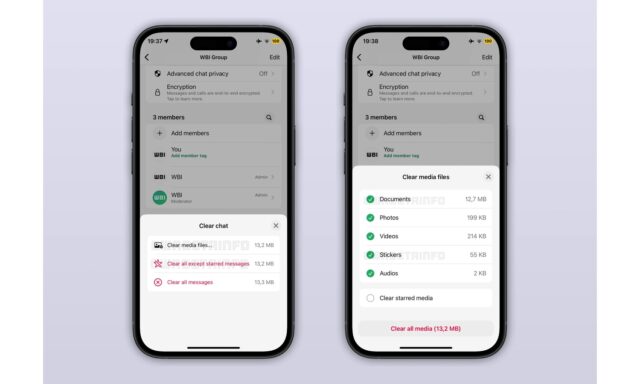
This new feature allows users to filter messages by type when clearing a chat. Previously, users could only clear all messages at once, but this update introduces options to specifically clear text messages, photos, videos, GIFs, audio files, documents, and stickers. According to WABetaInfoMeta, this feature is available to all iOS users on the latest version of WhatsApp.
The enhanced Clear Chat feature provides a more tailored approach to managing conversations. Users can now choose to delete specific types of media or messages, rather than clearing the entire chat history. This update allows users to retain important information while removing unwanted or unnecessary content. For instance, a user might choose to delete all photos and videos from a chat to free up storage space, while keeping the text messages for reference.
WhatsApp’s decision to introduce this feature is likely driven by user feedback requesting more control over chat management. By providing more granular options for clearing chats, WhatsApp aims to enhance user satisfaction and improve the overall messaging experience. The update aligns with WhatsApp’s ongoing efforts to refine its features and cater to the evolving needs of its user base.
The specific timeline for when this feature will be available on other platforms, such as Android, remains unknown. Details regarding potential future enhancements or expansions of the Clear Chat feature are also not available.
Users can expect to see this feature available on their iOS devices if they are running the latest version of WhatsApp. Further updates and refinements to chat management tools are anticipated as WhatsApp continues to develop its platform. It is likely that WhatsApp will monitor user feedback and usage patterns to inform future improvements to the Clear Chat feature and other aspects of the app.
How to use the new Clear chat feature:
- Update WhatsApp to the latest version on your iOS device to access the enhanced Clear Chat feature.
- Explore the new options within the Clear Chat menu to familiarize yourself with the available filtering options.
- Consider using the feature to manage storage space by selectively deleting large media files.
Follow us on Bluesky , LinkedIn , and X to Get Instant Updates