
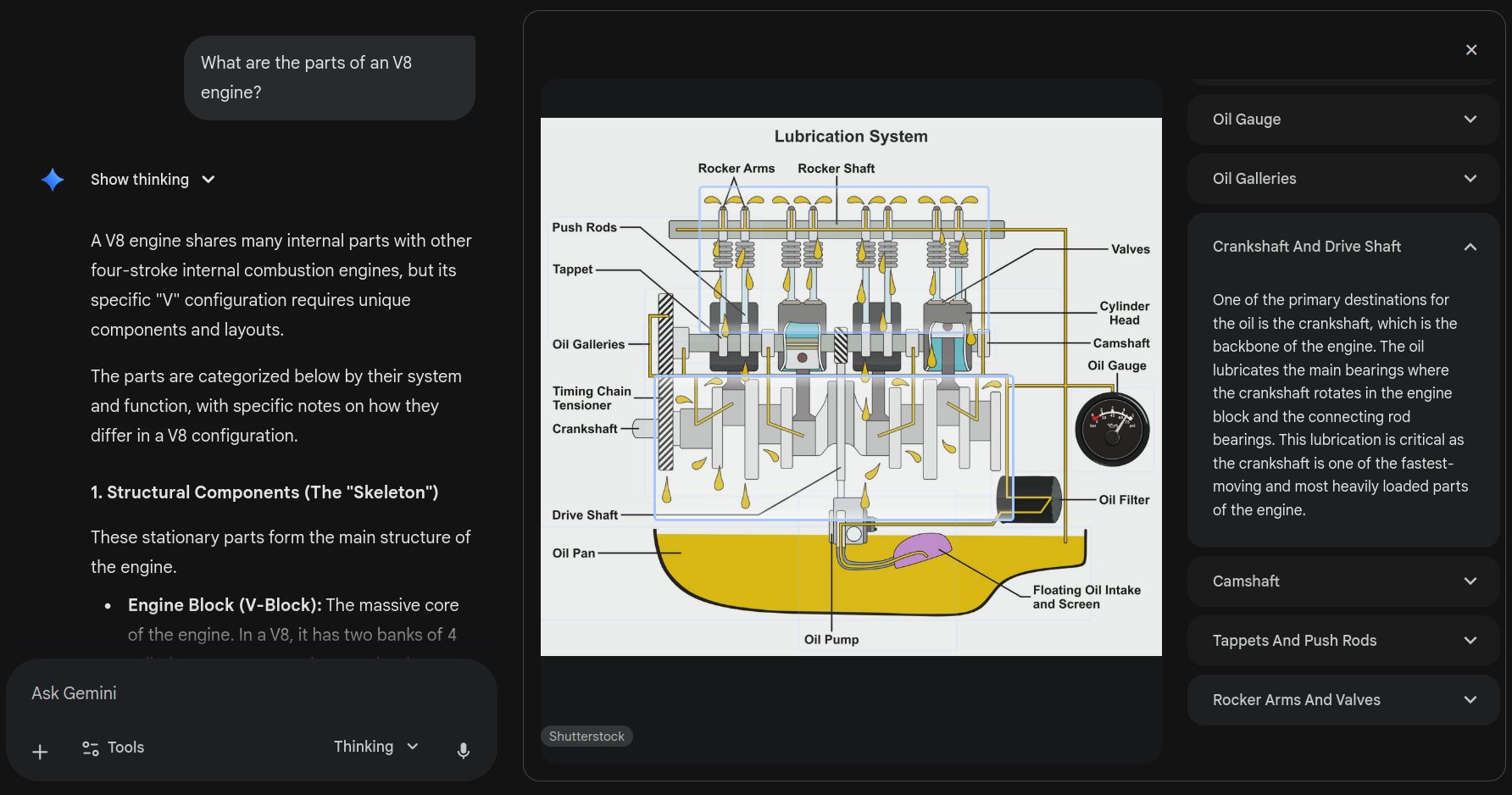
Google is now rolling out interactive images to the Gemini app for more visual and dynamic learning. It’s designed to help you visually explore complex academic concepts, turning studying from passive viewing into active exploration.
According to TestingCatalog, this new feature allows users to tap or click on specific parts of educational diagrams, such as anatomical or biological illustrations, to access panels with concise definitions, detailed explanations, and supplementary information.
How It Works
Imagine studying the digestive system or the parts of a V8 engine. Instead of just seeing a label, you can now tap or click directly on a specific part of the diagram to unlock an interactive panel.
The Technical Foundation
According to FindArticles, the system combines Google’s computer vision capabilities with Gemini’s language processing. The AI can recognize specific parts of diagrams, understand their context within the broader image, and generate relevant explanations on demand.
Availability: Who Gets It?
One user asked: “Is this feature only for Ultra users right now?”
Answer: It works for both AI Pro & Free. If you’re not seeing it yet, it’s likely either your prompt or the rollout hasn’t reached your account.
| Plan | Interactive Images | Status |
|---|---|---|
| Free | ✅ Yes | Rolling out now |
| AI Pro | ✅ Yes | Rolling out now |
| AI Ultra | ✅ Yes | Rolling out now |
The Interface Question
One user asked: “How do you get this horizontally out? My Gemini is a single column.”
Answer: Just click the “Explore” button on the interactive image, as shown in the video. The expanded horizontal view appears when you interact with the diagram elements.
Why This Matters
As one commenter insightfully noted: “This is the part people keep underestimating. AI isn’t just getting smarter, it’s becoming way more interactive and practical for everyday learning. Tools like this turn study time into exploration.”
The Science Behind It
According to research cited by FindArticles, a meta-analysis in the Proceedings of the National Academy of Sciences showed that active learning methods:
- Increased exam scores by 6%
- Decreased failure rates by 55% compared to traditional lecturing
Cognitive science research by Richard E. Mayer demonstrates that well-designed visuals combined with focused explanations reduce cognitive load and increase retention.
The Critical Counterpoint: Content Creator Economics
One commenter raised a crucial concern: “But where is the benefit to the information creator, or holder? AI has just scraped it and is taking a user away from its site. No upside for the website so they are likely to lock high quality information behind paywalls. Which ends up feeding the AI lower quality.”
The Attribution Problem
This is the central tension in AI-powered education tools. When Gemini generates an interactive diagram of a V8 engine, it’s synthesizing knowledge from:
- Engineering textbooks (copyrighted)
- Automotive websites (ad-supported)
- Technical documentation (often paywalled)
- Educational videos (monetized on YouTube)
As SammyFans notes, Gemini lets users ask follow-up questions, which helps learners go deeper—but none of those clicks generate revenue for original content creators.
Google’s Response
According to Gemini’s release notes, the system now includes “grounding with Google Search” and the File Search API, which references real-time information for accuracy. This at least provides some attribution trail, though it doesn’t solve the economic displacement issue.
WebProNews points out that Gemini’s emphasis on real-time knowledge integration suggests the system does cite sources—but whether those citations drive meaningful traffic back to creators remains unclear.
Real-World Applications
As one commenter observed: “Tools like this make me wonder how far interactive learning can go. If visuals help people explore dense ideas instead of just memorizing them, that feels like a real shift.”
Current Subject Coverage
| Subject Area | Example Use Cases |
|---|---|
| Biology | Cell structures, digestive system, photosynthesis |
| Engineering | V8 engine parts, network topology, circuit diagrams |
| Chemistry | Molecular structures, reaction pathways |
| Geography | Topographical maps, climate systems |
| Physics | Free-body diagrams, force interactions |
The Limitation
Current demos focus heavily on STEM topics, leaving questions about how well the system handles humanities, social sciences, or more abstract concepts that don’t translate easily to visual diagrams.
Powered by Gemini 3
According to Google’s developer blog, this feature builds on Gemini 2.5 Flash Image (aka “nano-banana”), which benefits from Gemini’s world knowledge and can read and understand hand-drawn diagrams, help with real-world questions, and follow complex editing instructions.
Google Research describes this as part of “Generative UI”—where the AI model generates not only content but an entire user experience, creating immersive visual experiences and interactive interfaces on the fly.
The Student Perspective
One enthusiastic commenter captured the excitement: “This is a game-changer for students. Turning static images into interactive learning makes complex topics way easier to grasp. Big upgrade for visual learners!”
According to early user feedback, the feature encourages active learning rather than passive reading. By letting users interact with pictures, Google is helping make learning more fun, simple, and meaningful.
The success of this feature depends not just on technical execution, but on whether Google can build sustainable attribution and compensation models for content creators. Otherwise, we’ll get increasingly sophisticated AI tools trained on increasingly degraded information.
For now, students and visual learners have a powerful new tool. The question is whether the knowledge ecosystem that feeds it can survive.