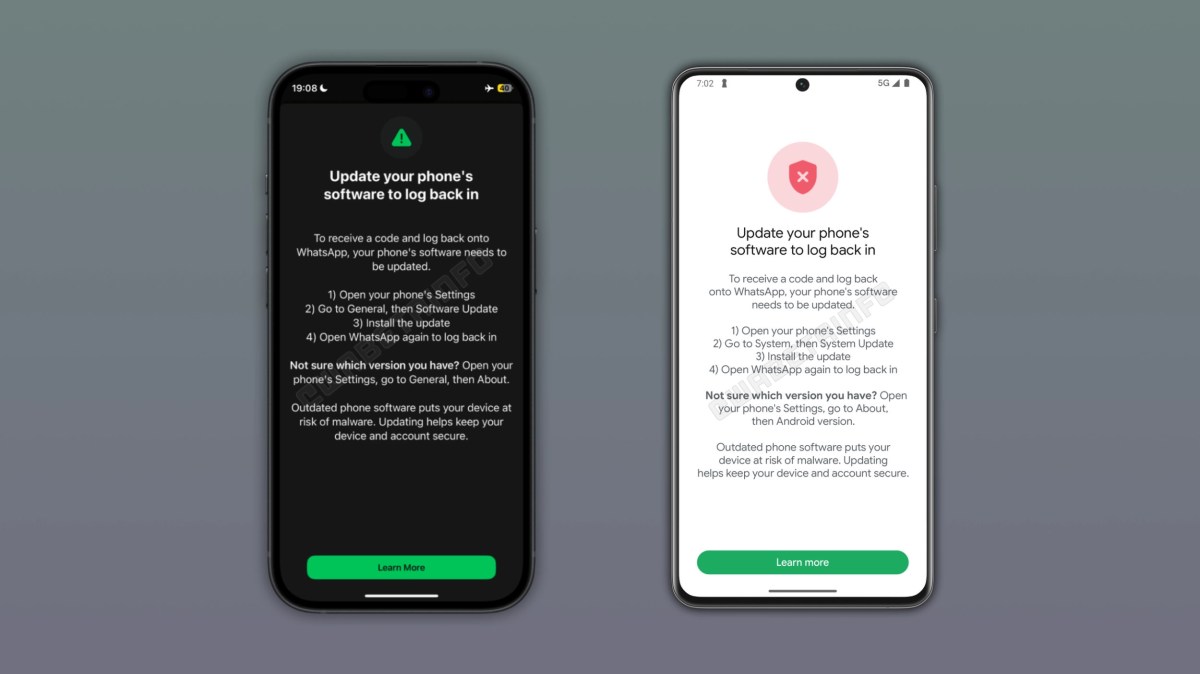
Users who hit the block will see a screen explaining what to do next: head into phone settings and install the latest system update. There is no way around it. Users must update their OS before they can log back in, according to a report from WABetaInfo.
Why WhatsApp Is Forcing the Issue
WhatsApp attributes the change to security concerns tied to older operating systems. The company believes devices running outdated versions of Android or iOS are exposed to active exploits, the kind that can be used to install malware without a user ever realizing it.
The risk here isn’t really about WhatsApp’s own encryption. Attackers go after known vulnerabilities in the operating system itself, not the app. And even with end-to-end encryption protecting message content, a malicious link sent by a trusted contact still bypasses that protection entirely once it’s clicked. Encryption secures what’s inside the message, not what happens after someone taps a link.
No Word Yet on Which Versions Are Affected
WhatsApp hasn’t said which specific Android or iOS versions trigger the block. There’s no published cutoff, no version number, nothing users can check in advance. The only way to find out if a device is affected is to try logging in and see what happens.
The block screen does at least walk users through checking their current OS version, which helps for anyone unsure whether their phone falls into the affected range. Beyond that, WhatsApp has stayed quiet on specifics, and it’s unclear whether more detailed guidance is coming.
What to Do If You’re Locked Out
- Open your phone’s settings and look for a system update option
- Install the latest available OS update for your device
- Reopen WhatsApp and attempt to log in again
- If your device can’t update further due to hardware limitations, you may need a newer phone to regain access
There’s no workaround for this one. WhatsApp has built the block to be non-negotiable, which means the update is the only path back into your account.
Follow Hashlytics on Bluesky, Facebook, LinkedIn , Telegram and X to Get Instant Updates