Samsung finally caught up to Apple and Google by bringing satellite connectivity to the Galaxy S26 series in February 2026. The Galaxy S26 Ultra, along with the S26 and S26 Plus, now supports satellite-based messaging and emergency SOS when traditional cellular and Wi-Fi networks are unavailable. Here’s everything you need to know about setting up and using this potentially life-saving feature.
What Is Satellite Connectivity on Galaxy S26 Ultra?
Satellite connectivity allows your Galaxy S26 Ultra to send and receive text messages via orbiting satellites when you’re outside cellular coverage. The technology uses Supplemental Coverage from Space and Non-Terrestrial Network protocols to establish connections with low-Earth orbit satellites operated by providers like Skylo and Starlink, depending on your carrier.
Unlike traditional cellular service that requires proximity to ground-based cell towers, satellite connectivity works anywhere with a clear view of the sky—remote hiking trails, offshore boats, rural areas with poor coverage, or during natural disasters when cell infrastructure fails. Samsung confirmed the feature is available in North America, Europe, and Japan through partnerships with major carriers.
Carrier and Regional Availability
Satellite connectivity on Galaxy S26 Ultra requires carrier support. In the United States, T-Mobile offers satellite services via Starlink partnership, providing both emergency SOS and general text messaging, with T-Mobile also supporting data over satellite. Verizon provides satellite SOS and text services through Skylo partnership. Samsung is actively working with AT&T to enable satellite features for Galaxy smartphones, though timing remains unconfirmed.
European users will find satellite support through carriers like Virgin Media O2 in the UK, MasOrange in Spain with trials beginning March 2026, and Vodafone UK with coming soon status. Japanese users can access satellite connectivity through KDDI for text and data on Galaxy S22 and later flagship devices, SoftBank and docomo for select Galaxy flagship and A series devices starting 2026, and Rakuten Mobile with upcoming support.
Step-by-Step: How to Enable Satellite Connectivity
Check Device Compatibility: Ensure you have a Galaxy S26, S26 Plus, or S26 Ultra running the latest software update. Go to Settings, then Software update, and tap Download and install to check for updates. Your device must support the feature — factory unlocked and carrier models both include satellite hardware.
Verify Carrier Support: Navigate to Settings, then Connections, and look for Satellite Networks. If this option doesn’t appear, contact your carrier to confirm satellite service availability for your plan and region. Some carriers may require you to opt-in or activate the service separately.
Configure Satellite Settings: Once available, tap Satellite Networks in the Connections menu. Toggle on satellite connectivity and review the terms of service. The system will explain how satellite connections work, including the requirement for clear sky visibility and automatic switching behavior.
Set Up Emergency Contacts: For emergency SOS features, designate emergency contacts within your phone settings. These contacts will receive your satellite messages when you activate emergency services in areas without cellular coverage.
How to Send Messages Via Satellite
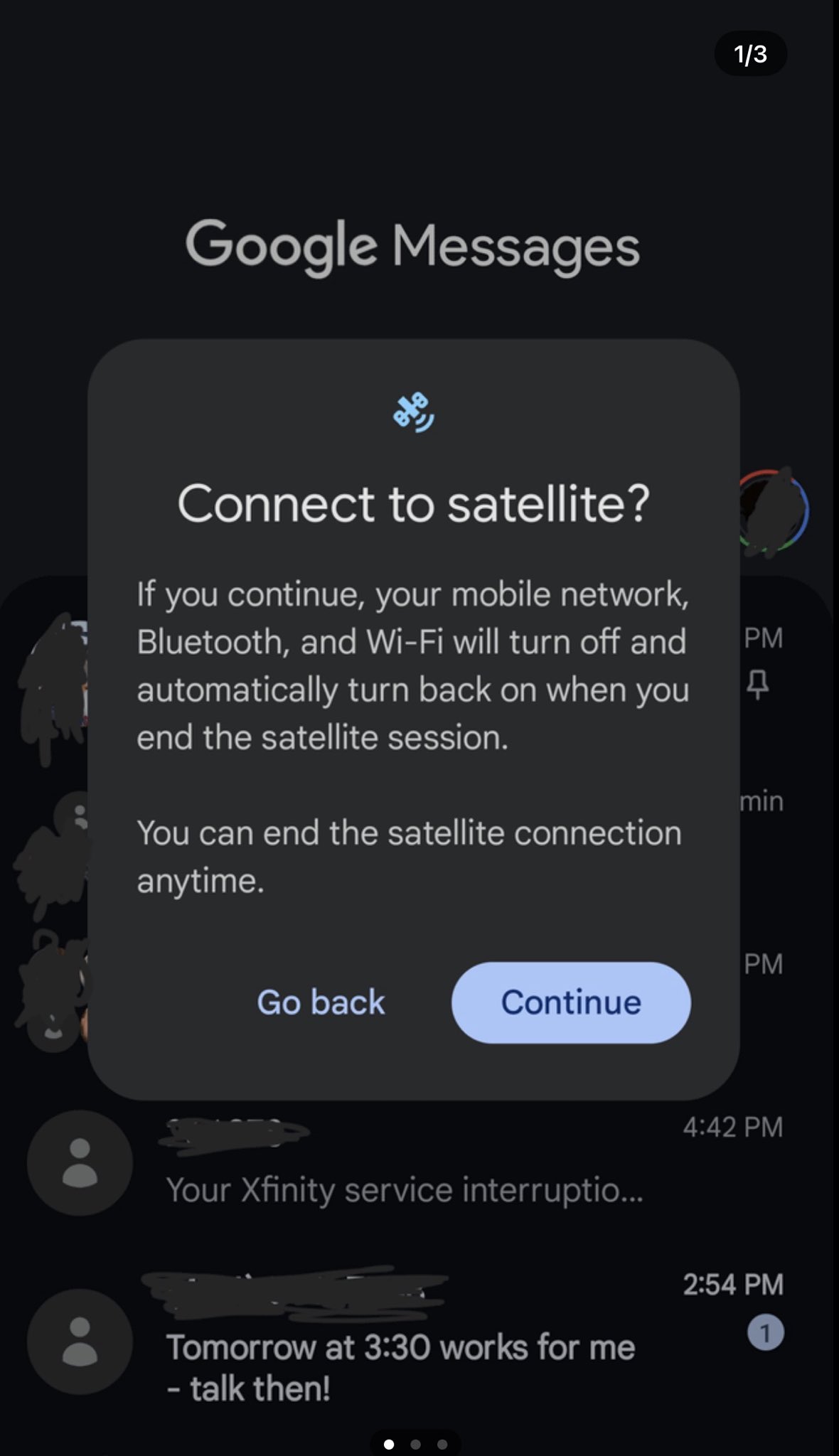
The Galaxy S26 Ultra automatically detects when you’ve lost both cellular and Wi-Fi coverage. When this happens, Google Messages—the default messaging app on Samsung devices—will display a popup asking “Connect to satellite?” The prompt explains that continuing will turn off your mobile network, Bluetooth, and Wi-Fi, which will automatically turn back on when you end the satellite session.
To use satellite messaging, you must be outside with an unobstructed view of the sky. Buildings, dense tree cover, mountains, and indoor locations will block satellite signals. Tap Continue on the satellite connection prompt, then point your phone toward the sky as directed by the on-screen alignment tool. The app will guide you to adjust your phone’s angle for optimal satellite lock.
Once connected, open Google Messages and compose your text message as normal. Remember these limitations: you can only send text messages—no photos, videos, or multimedia files. Group chats may not be supported on satellite connections. Message delivery may take longer than traditional cellular texting due to satellite relay delays. You can end the satellite connection anytime by tapping the disconnect option in Google Messages.
Emergency SOS Via Satellite
If you need emergency assistance in an area without cell service, the Galaxy S26 Ultra provides dedicated emergency SOS functionality. Press and hold the power button and volume down button simultaneously until the emergency menu appears. Select Emergency SOS, then choose Connect to satellite when prompted.
Follow the on-screen instructions to point your phone at the sky for satellite alignment. The system will ask you to answer pre-set questions about your emergency—type of help needed, injuries present, number of people with you, and whether authorities are already aware. These answers help emergency services understand your situation before arrival. The system will transmit your location coordinates, emergency details, and Medical ID information if configured. Stay in position with your phone pointed at the sky until confirmation that your message was received.
Best Practices and Limitations
Satellite connectivity works best when you maintain a clear, unobstructed view of the sky. Avoid using satellite features under heavy tree canopy, inside canyons, or near tall buildings. Battery consumption increases during satellite use—expect 15-20% battery drain per hour of active satellite connection. Plan accordingly for extended off-grid trips.
Weather conditions can affect signal quality. Heavy rain, thick cloud cover, and severe storms may degrade satellite connection reliability. Message transmission is slower than cellular—expect 30 seconds to several minutes per message depending on satellite position and signal strength. Your phone will disable mobile data, Bluetooth, and Wi-Fi during active satellite sessions to maximize connection stability.
Troubleshooting Common Issues
If the satellite option doesn’t appear in Google Messages when you lose cellular coverage, verify your carrier supports satellite services for your specific plan. Ensure location services are enabled—satellite connectivity requires GPS to function properly. Check for software updates that may enable or improve satellite features. Restart your device and try again if the satellite connection option remains unavailable.
For connection failures, move to a more open area with better sky visibility. Remove any phone cases or accessories that might interfere with satellite signal reception. Ensure your phone battery is above 20 percent—some devices disable satellite features at very low battery levels. If messages fail to send, wait for stronger satellite signal indicated by on-screen signal bars before retrying.
Understanding Costs and Service Terms
Emergency SOS via satellite is currently free on most carriers for Galaxy S26 series users. T-Mobile includes basic satellite messaging at no extra charge for qualifying plans, while specific data-over-satellite services may require premium plan tiers. Verizon offers satellite messaging included with compatible plans, though terms may change as the service matures. Samsung has not announced whether satellite services will remain free indefinitely or transition to paid tiers after introductory periods.
Check with your carrier for the most current pricing, coverage maps, and service terms. Some carriers may limit the number of satellite messages per month on free tiers or charge per-message fees for extended usage beyond emergency scenarios.
Why Satellite Connectivity Matters
Satellite connectivity transforms the Galaxy S26 Ultra from a device dependent on terrestrial infrastructure into a truly global communication tool. Whether you’re hiking remote trails, sailing offshore, traveling through rural areas, or caught in natural disasters that disable cell towers, satellite messaging ensures you can still reach emergency services or reassure loved ones of your safety.
The technology represents Samsung’s commitment to user safety and seamless connectivity, finally matching capabilities Apple introduced with iPhone 14 in 2022 and Google brought to Pixel 9 in 2024. For outdoor enthusiasts, emergency responders, journalists working in remote areas, or anyone who values communication resilience, satellite connectivity on the Galaxy S26 Ultra provides peace of mind that you’re never truly disconnected.
Follow us on Bluesky, LinkedIn, X, and Telegram to Get Instant Updates