How the New Transfer Actually Works
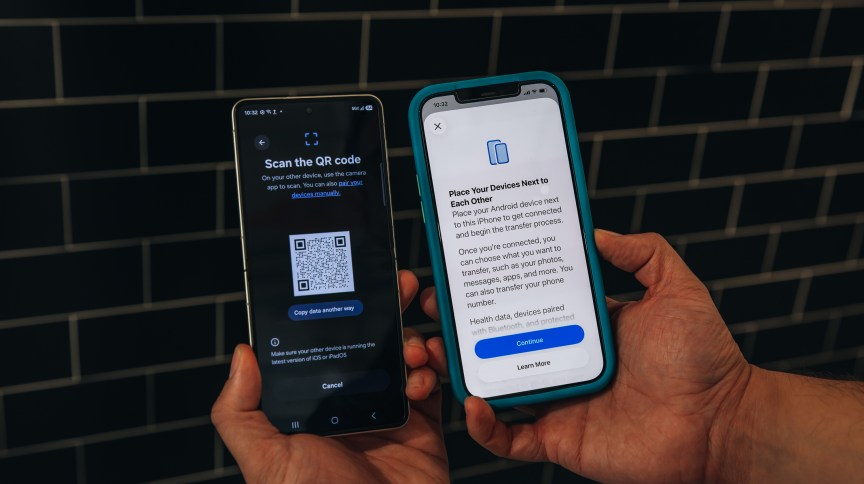
When you set up a new Android phone (like Samsung’s recently announced Galaxy Z Flip 8, Z Fold 8, or Z Fold 8 Ultra), the initial setup screen now asks if you’re switching from iPhone. You don’t need cables. Instead, you scan a QR code wirelessly, and your iPhone and new Android phone sync directly over the network.
Samsung’s updated Smart Switch app now integrates with iOS 26’s new Transfer to Android feature, meaning both companies worked together to make this seamless. That collaboration is the real story here. It removes the data inconsistencies that plagued earlier transfers.
What Actually Transfers (And What Doesn’t)
The system handles more than you’d expect:
- Messages and chat history: Text messages, group chats, and most media transfer over. However, iMessage to RCS conversion isn’t perfect yet—some initial messages might be missed immediately after switching, though follow-ups typically arrive
- Photos and contacts: These sync automatically via Google services, so they’re usually waiting when you first log in
- App data: Passwords and app preferences migrate, though you’ll need to re-download apps from Google Play
- Home screen layout: The system even replicates your iPhone home screen organization, replacing Apple’s apps with Samsung equivalents (for example, Samsung Health replaces Apple Health)
- eSIM: Your phone number can now transfer as an eSIM. Scan a QR code via the Android phone’s cellular settings, and your carrier switches over
Step-by-Step: What to Do Before Switching
One critical step prevents chaos: deregister your phone number from iMessage and FaceTime on your iPhone before you switch. If you don’t, messages from friends still using Apple devices might route back to iMessage and never reach your Android phone. Do this first, then start the transfer.
The transfer timeline: A complete switch including app downloads and logins takes around three hours. That’s a dramatic improvement over the days of manual work previous switchers endured.
What Still Needs Work
The system isn’t flawless yet. Error messages can be unclear if something fails. Some users report missing the first message or two in a conversation thread immediately after switching, though these are edge cases. iMessage-to-RCS encryption is still being developed, so encrypted messages aren’t guaranteed on the Android side yet.
These are solvable problems. Google’s Android Community Engagement Manager Mishaal Rahman confirmed that Android 17’s updated Android Switch tool will bring these features to more devices, including Pixel phones. As the system matures, expect these rough edges to smooth out.
Why This Matters Now
For years, iPhone’s ecosystem lock-in was a competitive advantage. Users stayed because leaving meant losing data. Now that Apple and Google have eliminated that fear, device choice becomes about features and price, not about being trapped. Samsung is betting on foldables, better customization, and AI features to win converts. Google is betting on affordability and direct OS updates.
The real winner here is the user. For the first time, switching platforms isn’t a technical nightmare. It’s just a choice.
Follow Hashlytics on Bluesky, LinkedIn, Telegram and X to Get Instant Updates