Bait Built for Security Teams
The early campaigns mimicked Visual Studio projects tied to blockchain games and crypto wallet tools. The latest wave goes after cybersecurity professionals directly, with projects that claim to offer automated security scanning, penetration testing, and log analysis.
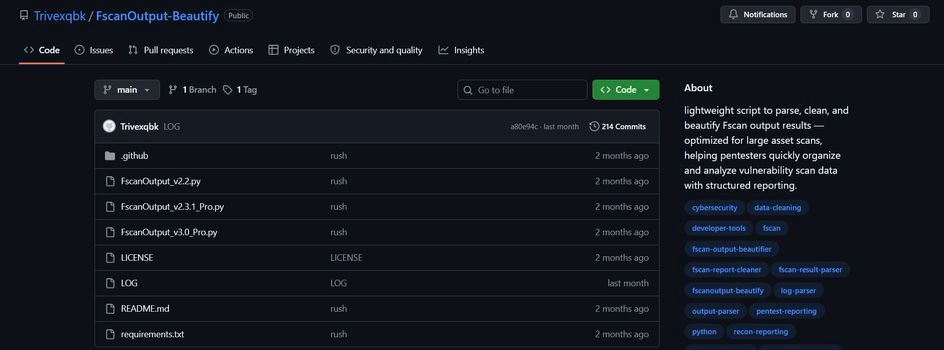
One malicious project pretends to analyze and clean output from Fscan, a legitimate security scanner. The attackers hide their code in Python and Go files behind large blocks of blank spaces to slip past detection. Each project also ships with step-by-step installation instructions, which makes it easy for less technical users to follow along and run it.
What Runs After the Project Opens
Opening an infected project triggers a PowerShell script automatically. It contacts the attackers’ command servers and pulls an encrypted link to an archive disguised as a Windows Photos component. The archive unpacks into a folder holding Microsoft.exe, the payload’s main program, built with the Electron framework.
The loader sends system details to a Telegram bot, then raises its own privileges and switches off Windows Defender, UAC, System Restore, and shadow copies. It adds its own Defender exclusions and removes McAfee, ESET, and Malwarebytes products from the machine. To get past what protection remains, its default Mode3 fakes its parent process, disables Smart App Control, strips security hooks from ntdll.dll, makes direct system calls, and patches event tracing in memory. If that fails, Mode2 adds Defender exclusions and injects through PowerShell instead.
Three payloads follow once the malware has a foothold:
- AsyncRAT: a RAT that runs as two identical copies on different ports, so multiple attackers can control one device at the same time
- Clipper: a module that swaps cryptocurrency wallet addresses in the clipboard during transactions and captures screenshots as proof
- Stealer: a component that harvests browser data, FileZilla credentials, MobaXterm configs, Total Commander settings, VPN configurations, messenger files, game accounts, and Discord tokens
Stolen data is compressed and sent out through Telegram. The malware also edits the hosts file to block antivirus vendors’ domains, so victims cannot download security updates.
Unfinished Code and What to Check
Doctor Web found unfinished code suggesting the attackers are still building. One incomplete component could install the malware as a persistent system service, re-download Microsoft.exe if it is deleted, and handle updates without any user action. An unreleased Electron project named WUDFHost.exe hints at more features to come.
Doctor Web’s recommendations for anyone pulling tools from GitHub:
- Keep antivirus software current and scan every downloaded file before running it
- Read a project’s source before executing it, especially tools that claim security functions
- Check commit history for suspicious additions and look for unusual build commands in project files
- Verify the project through official documentation or the vendor’s website
- Never run untrusted projects that ask for elevated privileges or modify system files
- Test unfamiliar tools inside an isolated virtual machine
Security professionals carry extra risk because attackers are targeting their profession specifically. Any security tool found on GitHub should be treated as potentially compromised until verified through official channels.
Hashlytics Take
This campaign works because it exploits normal behavior for the target. Security staff download unfamiliar scanners and log tools as part of the job, often run them with elevated privileges, and keep VPN configs, SSH client settings, and file transfer credentials on the same machine. That is almost exactly the list the stealer goes after. The advice to read the source first is sound, but padding Python and Go files with blank spaces is built to defeat a quick skim, so a disposable virtual machine is the more dependable habit. And because the loader disables Defender before the payloads run, any plan that relies on the endpoint catching the problem later has already failed.
Follow Hashlytics on Bluesky, Facebook, LinkedIn , Telegram and X to Get Instant Updates