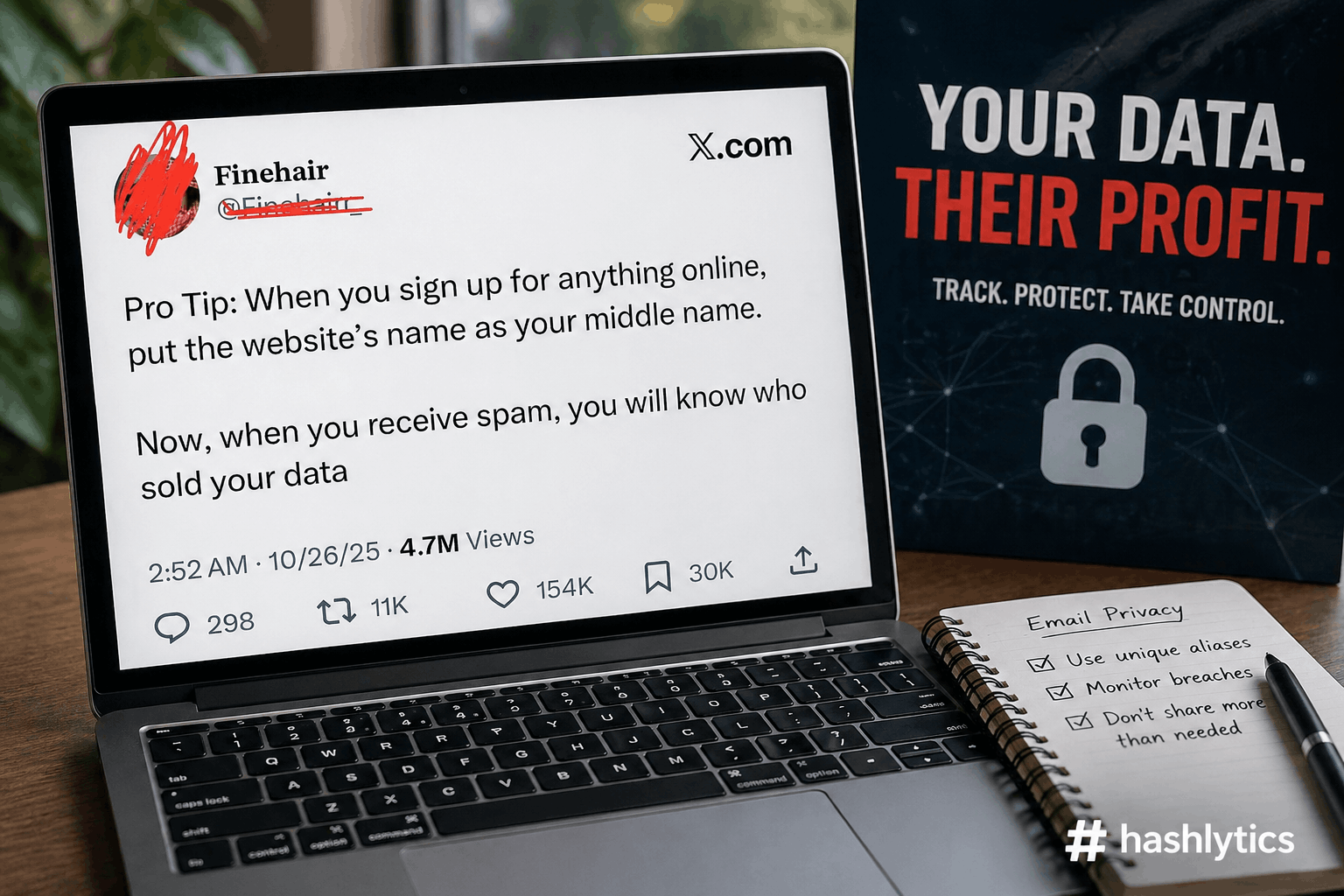
A viral privacy tip circulating X recommends using website names as middle names during online signups to track spam sources — but the advice contains a critical flaw that security experts say renders it useless for actual privacy protection. While the intention is sound, the execution exposes your real identity to the exact data brokers you’re trying to avoid. Here’s what actually works when you want to know who’s selling your email address.
Why the Middle Name Trick Fails
The X post that accumulated 4.7 million views suggests a simple system: when signing up for services, put the website’s name in the middle name field. If you later receive spam addressed to that middle name, you’ve identified the culprit. The logic is straightforward—if you register at BestBuy as “John BestBuy Smith” and later get spam to John BestBuy Smith, BestBuy sold your data.
The problem? Most signup forms don’t include a middle name field. Reddit users responding to the tip noted they “don’t remember ever seeing a sign up form (except for an official government document) that has a space for a middle name. Just first and last.” E-commerce sites, social media platforms, newsletter subscriptions, and app registrations overwhelmingly request only first name and last name, rendering the middle name strategy unusable for the vast majority of online signups.
Even when middle name fields exist, the approach provides tracking without privacy. You’re still giving the website your real first name, real last name, real email address, and real personal information—just with an unusual middle name. Data brokers receiving that information can trivially strip the middle name and link all your activity back to your actual identity. The tracking works, but you’ve protected nothing.
The Gmail Plus Trick: Popular but Broken
Commenters on the viral post immediately suggested the Gmail plus addressing method as a better alternative. Add a plus sign after your username and tag each signup — [email protected] for Best Buy, [email protected] for Amazon. All emails arrive in your inbox, and you can see exactly which tag received spam.
This technique is documented by Google as “plus addressing” for organizing incoming mail with filters. You sign up as [email protected], set up a Gmail filter to auto-label those messages, and your inbox stays organized. Thousands of tech blogs and Reddit threads recommend it as a privacy solution.
Security researchers have systematically debunked this claim. The plus trick provides zero privacy protection. When you sign up as [email protected], the company receiving that address can see your real email—it’s right there before the plus sign. Stripping the tag requires one line of code. Email marketing platforms, data brokers, and spam operations routinely sanitize plus addresses before adding them to databases, extracting the base email and linking all your tagged variations to a single identity.
As one commenter correctly noted, “companies also know that. they will definitely sanitize emails before sending spam promotions.” The plus trick works for personal organization — you can filter different types of mail into folders based on tags. It fails completely as a privacy measure because your underlying email address remains visible to everyone who receives the tagged version.
The Dot Trick Is No Better
Gmail ignores periods in email addresses, meaning [email protected] and [email protected] deliver to the same inbox. Users suggested this as a more subtle tracking method—sign up with specific dot patterns and see which ones get spammed. With a 10-character username, you can generate 512 unique dot variations.
Data brokers strip dots the same way they strip plus signs. The dot trick is slightly harder to detect than plus addressing because it looks like a normal email format, but email validation libraries used by marketing platforms routinely normalize Gmail addresses by removing all dots before database entry. You get the illusion of separation without actual privacy protection.
What Actually Works: True Email Aliases
Real privacy protection requires email aliases that completely hide your primary address. Instead of variations of your real email, you generate entirely separate addresses that forward messages to your inbox without revealing the destination.
Proton Mail Hide-My-Email generates random addresses on demand. When signing up for a service, create a new alias like [email protected]. Mail sent to that alias forwards to your real Proton inbox, but the sender never learns your actual address. If the alias gets spammed or compromised, disable it without affecting your primary account. Proton Mail offers this for paid subscribers, with basic plus addressing available on free tiers.
SimpleLogin and Addy.io provide standalone alias services that work with any email provider. Connect your existing Gmail, Outlook, or custom domain, then generate unlimited forwarding addresses. Each service gets its own unique alias. SimpleLogin offers 10 free aliases with browser extensions for Chrome, Firefox, and Edge. Addy.io provides similar functionality with different pricing tiers. Both create genuine separation—the alias is the only address the recipient sees.
Apple Hide My Email integrates into iOS, iPadOS, and macOS for iCloud+ subscribers. When signing up for services through Safari or apps, Apple generates random addresses that forward to your iCloud mail. The feature appears automatically in password autofill, making alias creation effortless. Apple’s implementation protects your identity even when you reply—responses come from the alias, not your real address.
Firefox Relay offers 5 free email masks through Mozilla’s privacy service, with paid tiers providing unlimited aliases, custom domains, and phone number masking. The browser extension suggests relay addresses automatically during signups. Mozilla’s focus on privacy means no tracking, no ads, and transparent data practices under European GDPR standards.
The critical difference: none of these services expose your real email address to the recipient. When BestBuy receives [email protected], they cannot extract your underlying Gmail address. If that alias starts receiving spam, you know BestBuy sold it, and you can permanently disable the alias while your primary email remains untouched and unlinkable.
The Custom Domain Catch-All Strategy
For users willing to invest in advanced privacy infrastructure, owning a custom domain enables unlimited unique addresses with zero configuration. Set up a catch-all email rule that accepts mail sent to any address at your domain. Register at BestBuy as [email protected], Amazon as [email protected], Netflix as [email protected].
All mail arrives in your inbox regardless of the specific address used. If spam starts hitting [email protected], you’ve identified the leak and can block that specific address without disrupting the others. Custom domain catch-all provides unlimited per-site addresses with perfect tracking—but requires purchasing a domain (typically $10-15 annually) and configuring email hosting through providers like Fastmail, Proton Mail, or Google Workspace.
One commenter detailed this approach: “Get your own domain. Activate ‘catch all’ in email settings. Use the name of the website before the @ when subscribing. Now you can tell by the email address where it came from. Plus you can block the address when it gets spammy. And if it is leaked no problem.” The method trades simplicity for comprehensive control—setup requires technical knowledge, but ongoing use is effortless.
Why This Actually Matters: The Data Broker Economy
The push for email privacy isn’t paranoia — it’s a response to a massive industry built on harvesting and reselling your contact information. Data brokers systematically collect email addresses from purchases, app signups, loyalty programs, and third-party platforms, then package that information into marketing lists sold to thousands of companies.
California’s Delete Act, which launched the Delete Request and Opt-Out Platform in January 2026, revealed the scale of the problem. Data broker Rickenbacher Data (operating as Datamasters) was fined $45,000 for buying and reselling email addresses of millions of people with Alzheimer’s disease, drug addiction, and bladder incontinence for targeted advertising. The company offered “Senior Lists” and “Hispanic Lists” based on age and perceived race, selling personal information without registration or disclosure.
Starting August 2026, California residents can submit deletion requests to all registered data brokers through DROP, with companies required to process requests every 45 days. But the system only covers registered brokers operating in California. Email addresses collected before deletion can be resold indefinitely, spread across dozens of downstream purchasers, and used to train AI models where extraction becomes nearly impossible.
Data broker BookYourData advertises 500 million verified B2B contact profiles. Data Axle USA maintains 315 million consumer email addresses available for purchase. ZoomInfo offers 321 million professional contacts with email addresses and phone numbers. These aren’t small operations—they’re billion-dollar industries where your email address is inventory.
How Companies Actually Use Your Email
When you provide an email address during checkout or registration, many services explicitly include data-sharing provisions in privacy policies that users accept without reading. Loyalty programs, contest entries, and “free” services frequently monetize through email list sales rather than direct product revenue.
Marketing platforms categorize email addresses by purchase history, browsing behavior, demographic assumptions, and engagement metrics. A single email address can appear in hundreds of purchased lists: “people who bought baby products,” “users interested in home improvement,” “consumers aged 25-34 in California,” “high-income earners based on spending patterns.” Data brokers use AI to infer characteristics you never explicitly provided — estimating income from your zip code, predicting health conditions from purchase patterns, and building psychographic profiles from browsing history.
Cross-device tracking links your phone, laptop, tablet, and smart home devices to the same email address, creating unified profiles that follow you across every online interaction. Even when you think you’ve used different accounts or devices, data brokers connect the dots through shared IP addresses, browser fingerprints, and tracking pixels embedded in emails and websites.
Once your email enters this ecosystem, removal is nearly impossible. Deletion from one broker doesn’t affect the dozens of companies that already purchased your information. Data gets resold, bundled into larger datasets, and fed into AI training pipelines where it becomes permanently embedded in model weights that can’t be edited or extracted.
Practical Implementation: How to Start
For most users, SimpleLogin’s 10 free aliases provide enough coverage for high-risk signups without requiring paid subscriptions or technical setup. Install the browser extension, generate a new alias when registering for questionable services, and track which addresses receive spam. When an alias gets compromised, disable it and create a replacement in seconds.
Gmail users already invested in Google’s ecosystem should understand that plus addressing protects nothing but can still organize incoming mail effectively. Use it for trusted services where you don’t care about privacy (government forms, bank accounts, known retailers) but want automatic sorting. Never rely on it for privacy protection—the base email is always visible.
iPhone and Mac users with iCloud+ subscriptions should enable Hide My Email for all new signups. The feature is free with iCloud storage plans ($0.99/month for 50GB) and integrates seamlessly into Safari autofill. Apple’s implementation provides genuine privacy protection with zero friction.
For users serious about privacy-protecting encrypted services, migrating to Proton Mail or Tutanota provides end-to-end encryption alongside robust alias systems. Proton Mail’s Swiss jurisdiction protects against US and EU government data requests, while Tutanota’s German base operates under strict European privacy laws. Both encrypt email content, subject lines, and contacts—data points that Gmail leaves unencrypted even with TLS transport encryption.
Advanced users should consider custom domain catch-all systems for unlimited addresses with permanent control. Services like Fastmail ($5/month) and Proton Mail’s custom domain plans ($4/month) provide professional email hosting with catch-all rules, unlimited aliases, and full ownership. You can change providers while keeping your addresses by simply pointing DNS records to a new mail server.
What About Phone Numbers and Physical Addresses?
Email isn’t the only data point worth protecting. One commenter shared a simple approach for physical addresses: “my pro tip when a website wants an address and you dont want to give their is a supermarket 200m from me they get that postcode.” Using a nearby public business address prevents home address exposure while satisfying form validation requirements.
For phone numbers, services like Google Voice, MySudo, and Burner generate temporary numbers that forward to your real phone. Create unique numbers for different services, track which numbers receive spam calls, and disable compromised numbers without changing your actual phone. This becomes especially important as governments push scanning initiatives that tie phone numbers to identity verification systems.
The Regulatory Landscape Is Changing
California’s DROP platform represents the first comprehensive data deletion mechanism where residents can force all registered brokers to remove their information with a single request. Vermont, Texas, and Oregon maintain data broker registries but lack centralized deletion systems. The patchwork of state laws creates confusion—what works for Californians doesn’t help residents of other states.
European GDPR requires explicit consent before collecting email addresses for marketing, giving EU residents stronger protections than Americans. Companies operating globally must provide deletion and opt-out mechanisms for European users while maintaining different standards for US customers. Apple’s threat to remove privacy features in Europe highlights ongoing tensions between privacy regulations and tech company business models.
The FTC has increased enforcement against data brokers selling sensitive location data. Gravy Analytics and Venntel were sanctioned for tracking consumer visits to health clinics, places of worship, and political events without consent. However, email address sales remain largely unregulated at the federal level, with industry self-regulation providing minimal consumer protection.
California increased data broker registration fees to $6,600 annually in 2025 to fund DROP operations, with penalties of $200 per day for unregistered brokers. CalPrivacy’s enforcement actions have shut down Background Alert and fined multiple companies for operating without registration. But dozens of data brokers deliberately hide opt-out pages from search engines, making it nearly impossible for consumers to exercise privacy rights even when legal protections exist.
The Bottom Line: Gmail Plus Isn’t Privacy
The middle name trick and Gmail plus addressing both provide tracking capabilities without privacy protection. You can identify which services sold your data, but you haven’t prevented them from selling it in the first place. Your real identity remains exposed, linkable, and resellable.
True email privacy requires tools specifically designed for anonymity: SimpleLogin, Proton Mail Hide-My-Email, Apple Hide My Email, Firefox Relay, or custom domain catch-all systems. These generate genuinely independent addresses that hide your primary email from recipients, data brokers, and spam operations.
The choice between organization and privacy is clear. Gmail’s plus trick organizes your inbox while exposing your identity. Email aliases protect your identity while requiring slightly more setup. For casual signups where you don’t care about tracking, use plus addressing for filtering. For anything involving money, health, politics, or personal information, use real aliases that actually hide your email address.
As Google finally lets users change their Gmail addresses in select regions starting 2026, the ability to migrate away from compromised email addresses becomes more accessible. But changing your address doesn’t delete the data already sold to hundreds of brokers. Prevention through aliases is more effective than cleanup after exposure.
The data broker industry is worth hundreds of billions of dollars because email addresses are valuable inventory. Each address represents a trackable individual with purchasing history, browsing patterns, and inferred characteristics. Protecting that email means keeping yourself out of databases where removal is functionally impossible. The tools exist. The question is whether you’ll use them before your address gets sold to the next batch of 500 million contact profiles.
Follow us on Bluesky, LinkedIn, X, and Telegram to Get Instant Updates