The Problem with the Action Button
The iPhone’s Action Button has always been versatile. You can run quick actions, trigger custom shortcuts, activate focus modes, and more. But here’s the catch: the Shortcuts app that powers this customization is confusing for most people. Creating even simple automations requires navigating menus, stacking conditions, and linking actions together in ways that feel more programming than phone usage.
As a result, the Action Button sits dormant on millions of iPhones. People either stick with Apple’s preset options or resort to copying pre-made shortcuts from the internet, never quite personalizing it to their actual workflow.
Meet “Describe a Shortcut”
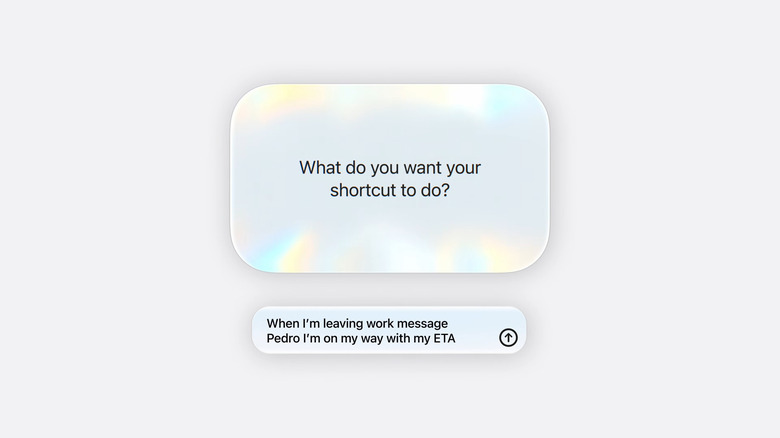
iOS 27 changes this with a feature called Describe a shortcut
, powered by Apple Intelligence. The concept is refreshingly simple: describe what you want the Action Button to do in plain English, and AI builds the shortcut for you.
Want to set an alarm for 9 a.m.? Just say that. Need something more complex like When I set the phone to Silent Mode, turn on color filters, enable Always On Display, and start a Pomodoro Timer with 25 minutes work and 10 minutes rest
? That works too. Type it out, hit enter, and the AI generates the entire workflow automatically.
How It Actually Works
The process is straightforward. Open the Shortcuts app, tap the new New Shortcut button, and describe your desired action in natural language. Apple Intelligence analyzes your request and builds the shortcut for you.
Once generated, you can review the result and make tweaks by typing suggested changes. A play icon lets you test the shortcut immediately, and a hamburger menu lets you add additional steps if needed. It’s a conversation with your phone rather than a configuration wizard. As demonstrated in this Apple YouTube video, the entire process takes seconds.
Lowering the Barrier to Entry
The real significance here is accessibility. By replacing Shortcuts app complexity with natural language prompts, Apple is democratizing a feature that previously required technical knowledge. The Action Button transitions from a power-user tool to something genuinely useful for everyone.
This feature is available on compatible iPhones running the iOS 27 Beta, with refinements ongoing before the general release. Beyond the Action Button, iOS 27 also introduces kid safety features and more control over Liquid Glass appearance.
This shift reflects a broader trend in how Apple is integrating AI into core iPhone features. Rather than adding new capabilities, Apple is removing friction from existing ones. The Action Button example shows how AI can bridge the gap between powerful functionality and user accessibility.
iPhone 15 and newer models will also get an AI-powered Siri as part of this rollout, further cementing the shift toward smarter automation. The result: a phone that adapts to how you work, without requiring you to become a programmer to set it up.
This represents a significant step forward in making advanced iPhone features available to everyone. What was once a niche power-user tool is becoming a standard part of how people interact with their devices.
Follow Hashlytics on Bluesky, LinkedIn, Telegram and X to Get Instant Updates