The Taskbar Finally Moves Again
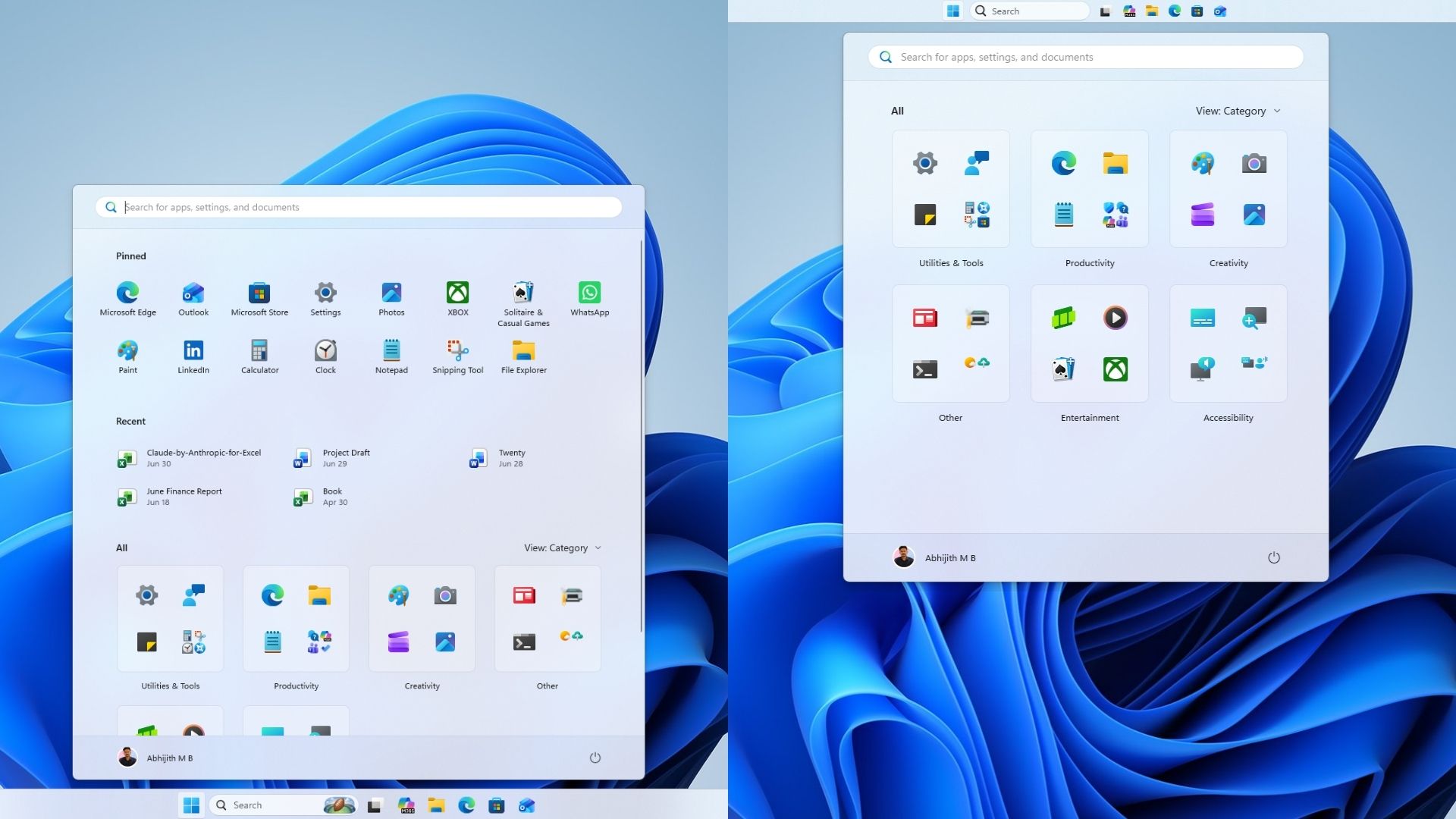
The headline change is a movable taskbar, a feature missing since Windows 11 launched back in 2021. Users can now position the taskbar on any screen edge, undoing a design decision that drew criticism for years. The setting lives under Settings, Personalization, Taskbar, Taskbar behaviors.
A smaller taskbar option is also available, shrinking both icons and the bar’s overall height. That said, the search box and the smaller taskbar variant currently only work when the taskbar sits at the top or bottom of the screen.
Start Menu Gets Real Customization
The Start menu received an overhaul aimed at fixing its often oversized footprint on smaller laptop screens. Users can now pick between Automatic, Small, or Large sizing under Settings, Personalization, Start, Start menu size, replacing the adaptive layout Microsoft used previously.
The “Recommended” section has been renamed “Recent,” and Pinned, Recent, and All apps now have independent toggles so users can hide sections they don’t want. A new option to hide your name and profile picture on Start should appeal to streamers and anyone who shares their screen regularly.
Search Gets Faster and More Private
Windows Search picked up meaningful privacy and performance changes. A new section under Settings, Privacy and security, Search lets users disable Web Searches and Microsoft Store suggestions independently, turning Search into an instant, local only tool if that’s what someone wants.
The Search interface is simpler now too, prioritizing recent searches over promotional tiles. Results carry clearer labels showing whether something is an app, file, setting, web result, or Store suggestion, and automatic indexing of frequently used folders speeds up how quickly results appear.
Enterprise Gets Tighter Admin Controls
Administrator protection is beginning its rollout, moving Windows toward just-in-time privilege elevation. The feature creates temporary, isolated admin tokens for specific tasks rather than granting standing admin access, which helps guard against elevation of privilege attacks. It stays off by default and requires IT to turn it on.
Windows Autopilot device preparation has reached general availability for device association, and Microsoft Execution Containers now support Process Isolation, giving lightweight boundaries to agentic and coding tasks. Separately, the WMIC utility has been fully removed from Windows 11 24H2 and 25H2, with no way to restore it.
A Record Security Patch Alongside the Features
This Patch Tuesday also fixed 966 security vulnerabilities, the largest single Patch Tuesday release Microsoft has shipped. Of those, 105 are rated Critical, including 81 remote code execution flaws.
- Two zero-days are being actively exploited right now, both allowing attackers to gain SYSTEM-level privileges
- One affects the Windows Update Stack, the other targets Windows ALPC
- An additional 204 vulnerabilities were patched earlier in the month, separate from the September total
Microsoft has attributed part of the increase in reported vulnerabilities to its AI-powered vulnerability discovery system finding issues that manual review previously missed.
What This Means for Secure Boot
The update also expands high confidence device targeting, increasing how many devices are eligible to automatically receive new Secure Boot certificates. Devices only receive these certificates after showing consistent, successful update history, keeping the rollout controlled and phased rather than immediate.
This matters because Secure Boot certificates used by most Windows devices began expiring in June 2026. Devices that haven’t updated in time risk being unable to boot securely, so reviewing Microsoft’s Secure Boot guidance now is worth doing before it becomes an urgent problem.
How to Get the Update
To install, go to Settings, Windows Update, and select “Check for updates.” Turning on “Get the latest updates as soon as they’re available” can speed things along. Keep in mind that some features are subject to Microsoft’s Controlled Feature Rollout system, so certain changes may not appear immediately even after installation completes.
Hashlytics Take
Two zero-days already being exploited in the wild is the detail that should move this update to the top of anyone’s install queue, features aside. The taskbar and Start menu changes are the ones getting attention because they’re visible and long requested, but 81 remote code execution flaws getting patched in a single release is the more urgent story here. Install the security fixes first. Enjoy the taskbar second.
Follow Hashlytics on Bluesky, Facebook, LinkedIn , Telegram and X to Get Instant Updates